Thursday, March 30, 2017

Kya's Colorization

Today I will be colorizing Ulysses S. Grant using Photo Shop. He was the 18th president of
  U.S., was very close friends with our 16th president, Abe Lincoln, and lead the
   Union Army to victory in the American Civil War.                                                                                                                                                                                                      


First Step Of Colorization : I have colored Ulysses´s eyes a nice light shade of brown ( his eyes were really blue,but I didn´t know ) . This is how
I came about this process : I zoomed in close to his eyes to make sure I got everything,I cut out his eyes &
and made a separate layer with just them on it.I selected his eyes and then went to the color pallet.I choose a nice brown,colored his eyes in with it,and clicked overlay.This was my result.


2nd Step Of Colorization : I have colored Ulysses Grants eyes to match his hair. I did this with Photo Shop by zooming in on his hair,to make sure I got egdes and all.I selected it,cut it out,and made a separate layer with just it. The color pallet stays on the same color after you use it,which is very convenient.So, I selected his hair,then selected the same brown as I did before with the eyes,clicked overlay,which is a very handy tool on Photo Shop,and this was my product.


3rd Step Of Colorization :


Bryson
no
yes
keep doing what you're doing it's good so far
lol have fun

Wednesday, March 29, 2017

Carli Landry's Colorization

Carli Landry's Colorization

I am going to use Photoshop to colorize this black and white
 picture of the 16th President, Abraham Lincoln.  

Day 1:
      Today I changed the color of the background from
grey and white to blue and white. I used the Quick
Selection Tool in Photoshop to do so. I have to be
sure not to include ANY of his hair. I used a darker
shade of blue for this change. To add the color I used
the Brush Tool.

Day 2:
      Today I am going to change the color of his suit to 
a darker shade of black. I will be using the Quick 
Selection Tool for the change also. I have to make sure 
that I don't select the white part of his suit, or it will 
make that part look grey.
      

Friday, March 24, 2017

PhotoShop-Kloie Edgerly


      First Day!


              Today On Thursday March 2, I will be trying to change the color of the
             soldiers hats. To a darker color to make their hats a little more like a soldier's
            hat.


    Second Day!


Aarron Carpenter- Colorization


The goal of it to show you the steps on the colorization of Harriet Truman. First I'm going to color her skin.


Dillan Daniels.
No I did not find any tools.
Yes I found complete sentences.
They could say what tools they used and the steps they took.

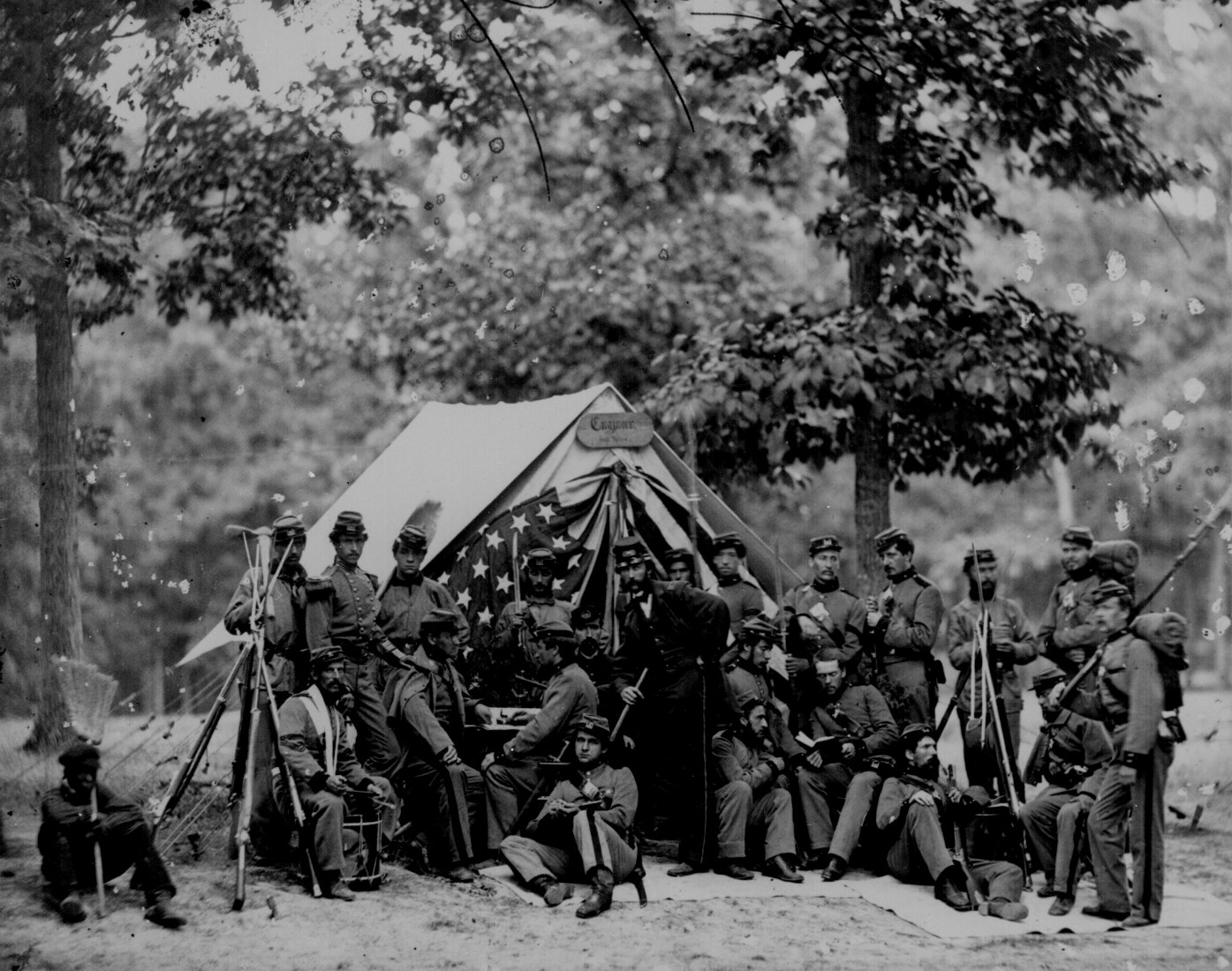
This is my original photo. Its a picture of the civil war during 1861-1865. 


This is after I changed the tent and the tree. I highlighted the tent and the tree and right clicked. Later, I selected the paint brush and then chose a dark brown and a light green for the color of the tent and the tree.


colorization Daniel Word

Hi ,my name is Daniel Word and I am going to change him from black and white to color .


i'm changing his black and white hair to a reddish orange.I clicked on the quick selection tool and selected his hair. I


Historical Coloration Photo

Here's the historical photo I started to color.
With this picture of Harriet Tubman, I will now begin to colorize her sweater.

Meagan's Color Change

I will be colorizing this photograph of the Titanic.


This is the original photograph that i will be using for the colorization.

Day 1


I added in the color of the water and the bottom of the ship however the ship looks, as you can see, bad for the colorization. The tools I used were the selection tool and the paint brush for the actual boat.
I used this as the reference photograph so I could color the picture correctly.

Jeann's Coloration

I am going to show you the process of making Abraham Lincoln color.
This is the reference I am going to use for the photo because it looks the same as the one I'm coloring, but there is no frame
One of the tools I will use is the brush tool. I will use the brush to fade the edges of the frame as you can see in the picture below. 
Next I highlighted the suit and I painted it black. This will take the white dots on the suit off.

History colorized

Hello there, I am Travis Mistry and I am proud to present my colorized version of Anne Frank. Before I show my photoshop project I want you to know that I was very nervous about picking her as a historical figure to colorize. I was mainly scared because I know I'm really bad at photoshop and I didn't want to offend anyone. Hope you find it at least decent. : )


                                         I used this as my reference picture (I know it's not the same as the one that I'm actually colorizing but I really liked this one):


                                                         This is what I started with:

On the first day I tried working on the background.
          I choose brown because the background on my reference
 picture was brown 
I used multiple steps to get to the brown 

Wednesday, March 8, 2017

        Hi my name is Kevin Figueroa and i will be colorizing Harry S. Truman.He is the 33rd president of The United States.I will be coloring him using photo shop.This will take a few days I will be doing certain things on certain days

Cody's Colorization project

Cody's colorization project over the Titanic.


Day 1: I will be using a photo of the famous Titanic.

Since I will be using only the real colors this will be my reference photo. 


I will be using this lasso tool as shown in the photo below to do all of my recoloring.
Day 1: Today I will be focusing on the colors of the sky. Now for this you'll have to zoom in to be sure you avoid selecting the ropes and wires.

Day 2: Today I will be focusing on changing the colors of the water. Make sure you go slow and zoom in around the sky and ship. It is hard to find just the right color to make the water look as realistic as possible. I ended up choosing a dark blue ish green.


Day 3: Now after having colored will be coloring the smoke stacks. You have to avoid the wires and clouds so be careful.


Day 4: Today on the fourth day I will be coloring the hull of the ship. This was not easy considering the hull was solid black. I had to go and zoom in and make the line as straight as possible, because half of the hull was black and half was red.


This is what you end up with when you completely color it.

I am now completely finished recoloring the Titanic.

Monday, March 6, 2017

Samuel Lopez colorization

I am going to turn this black and white picture of Albert Einstein, and turn it into a colorized picture using photoshop.


The first day, I changed the background, his hair, and his mustache. I did this by making a separate layer for each one of those features, and colring them with with the brush tool. Once I did that, I went on bleding options by right clicking on the layers and clicked on blending options, and chose the overlay option.


The next day I worked on his hands and sweater. Doing the same thing i did the day before(creating new layers for each feature, coloring the feature, and lastly going to blending options and choanging the blending mode to overlay).


The last day I worked on his face and details.


Noah Escareno Colorization

For this project, I will be colorizing this photo of a German WWI plane.


I first started by creating the color of the plane itself. I selected the 
area of the plane and created a new layer for the color.


I wanted to make a new layer to change the transparency of the color so the
 texture of the plane will show through.


I also forgot to color in the crosses on the plane.


Next, I attempted to produce a good looking sky color. This took several
combinations of colors ranging from deep purple to the lightest blue.


 Personally, colorizing the small post in the middle proved a surprisingly
 more difficult challenge than anticipated.
 This was most likely due to user error.


I did eventually (after thirty minutes) get this tiny
 little post to be an appropriate color.

As my final step in this project, i needed to color the grass in the field the plane landed in.


Ashley Sanderson Colorization

Today i am working on doing photoshop. I will be colorizing a plane called Sky King. My plane will start off as black and white and will gradually get color as I continue throughout the days of working on it. This is what my plane looks like before I do anything to it. As you can tell, I have not made any changes so far.

Day 1: It's not the best, but on the first day of colorization, I changed the main part of the plane to a red color. Besides the sky and ground, I'm going with a red/green theme. You'll be seeing more as I continue.

Day 2: I did the red color on and stripes on the second day. I didn't do much except for this on the second day, but my lack in working is made up by the next day i worked on colorizing this plane.

Day 3: On the third day, I did the letters on the plane and the green and red on the propellers. This took up three layers, because I wanted to make sure that each was colored accordingly.

Friday, March 3, 2017

Dillan Daniels: Colorization

Today I am starting with a black and white photo, then I'm adding color to it. Here are the steps that I did.


With the Quick Selection Tool get the area you want to color.


Then copy the layer and color the area you want to color.


Then I added color to the uniform in the back.


Once a did the first one I did all of the uniforms the same color.